
タイトル通り、「自然文で画像を検索して画像 / 感情解析をする Bot」を作って遊んでみました。
コード書いてる時間よりも、LUIS でチューニングしている時間の方が長かったかもw
まずは成果物
使い方は、「野球の画像を探して」とか、「猫の画像をみつけて」とか、「空飛ぶペンギン」とか、「怒っている人の画像をさがして」とか。
画像を探す系の文章を入力してください。
Speech to Text を人間系でやってるみたいな感覚でw
まぁー、今回は LUIS のお勉強です。
今回の構成はこんな感じです。
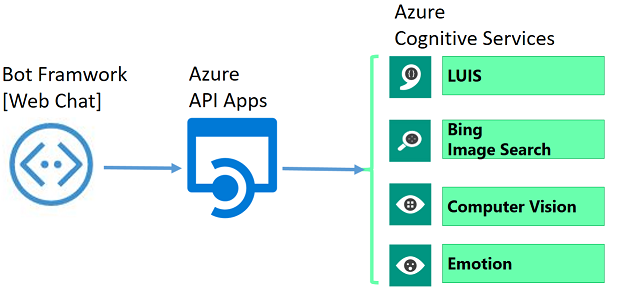
Web Chat から受け取った文字列を、LUISを使ってキーワード抽出をします。
- 「野球の画像を探して」からだと、「野球」
- 「猫の画像をみつけて」からだと、「猫」
- 「空飛ぶペンギン」からは、「空飛ぶペンギン」
- 「怒っている人の画像をさがして」からは、「怒っている人」
「空飛ぶペンギン」は、「空飛ぶ」と「ペンギン」
「怒っている人」は、「怒っている」と「人」
に分けるのもありだと思いますが、今回はまとめた感じにしました。
あとは、LUIS で Get したキーワードでBing Search API で画像検索して、
その画像をComputer Vision とEmotion APIで解析しています。
画像解析しているとこは、今回のつくりではおまけ的な感じですが、
LUISのキーワード抽出で感情的な要素を抜き出して、Emotion API のスコアを評価してあげても面白いかもですね。
LUIS
LUISは、Language Understanding Intelligent Service の略です。技術情報は以下をごらんください。
https://azure.microsoft.com/ja-jp/services/cognitive-services/language-understanding-intelligent-service/
今回やったことの雑なまとめ
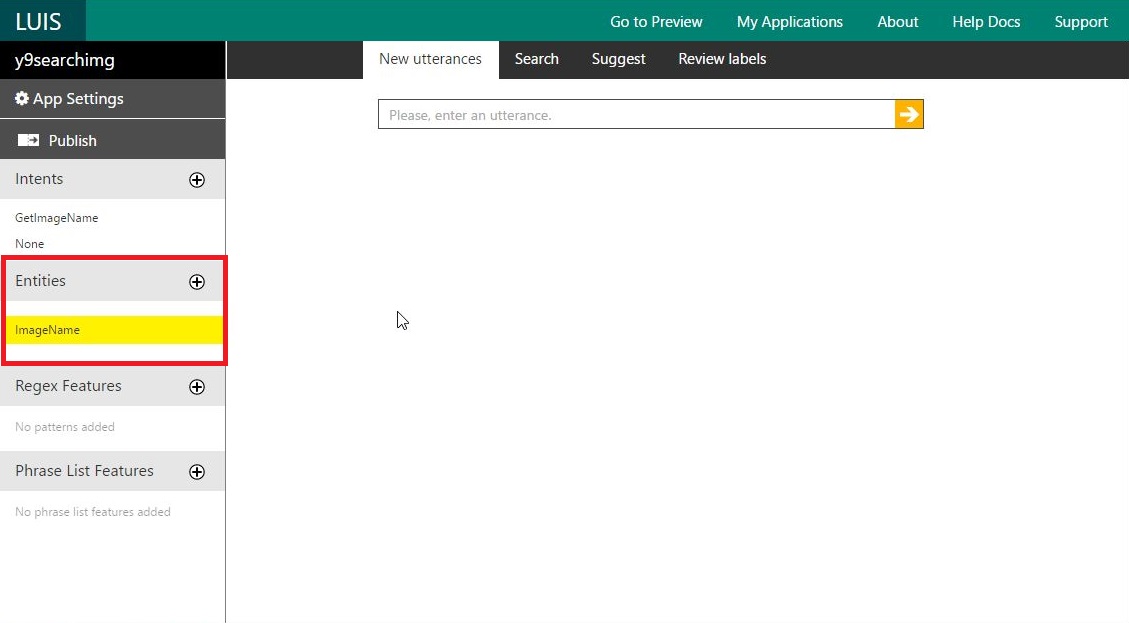
まずは、Entities でキーワード抽出する属性を定義します。
今回は、ImageName という名前を付けましたが、Bing Search API に渡すための検索キーワードを受け取る属性です。
複数作ることもできますよ。
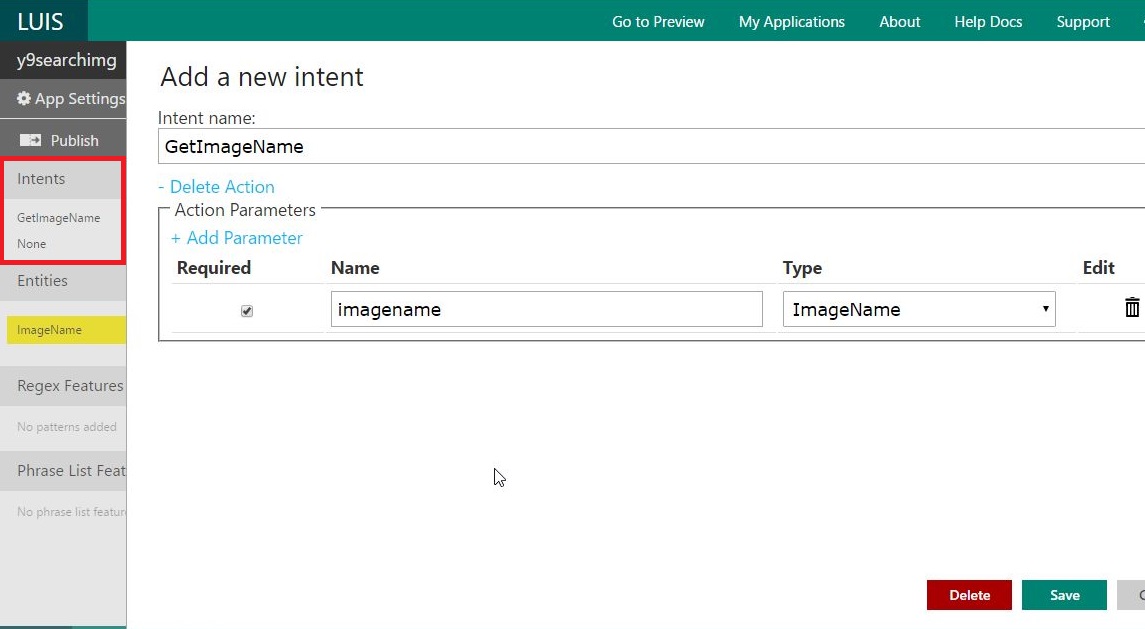
続いて、Entities にデータを振り分ける intent を作ります。
GetImageName という名前で intent を作り、先ほど作った ImageName を振り分けるパラメータに指定します。
こんな感じで適当に文章を入力して、Intent と パラメータにあたる箇所を選んでいきます。
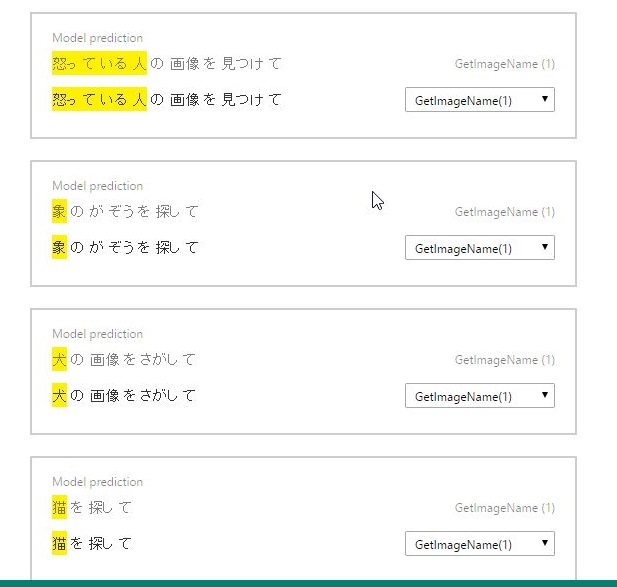
学習させる例文ができましたら、Train で学習させ、Publish します。
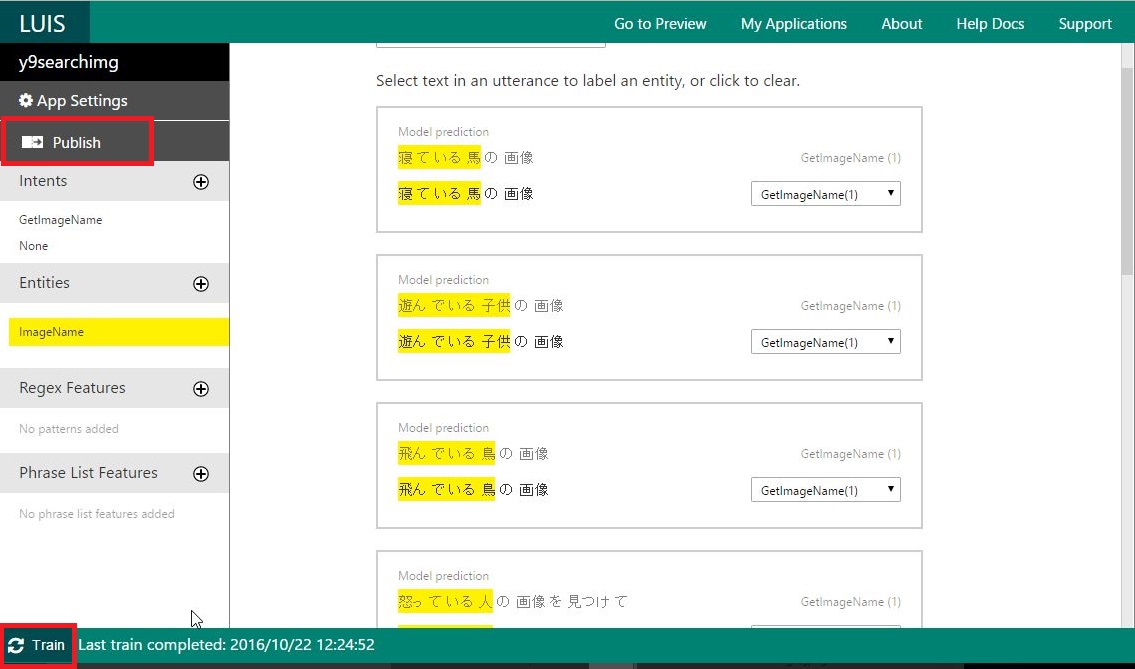
うまく動くか動作テスト
「赤い家の画像」で確認しました。
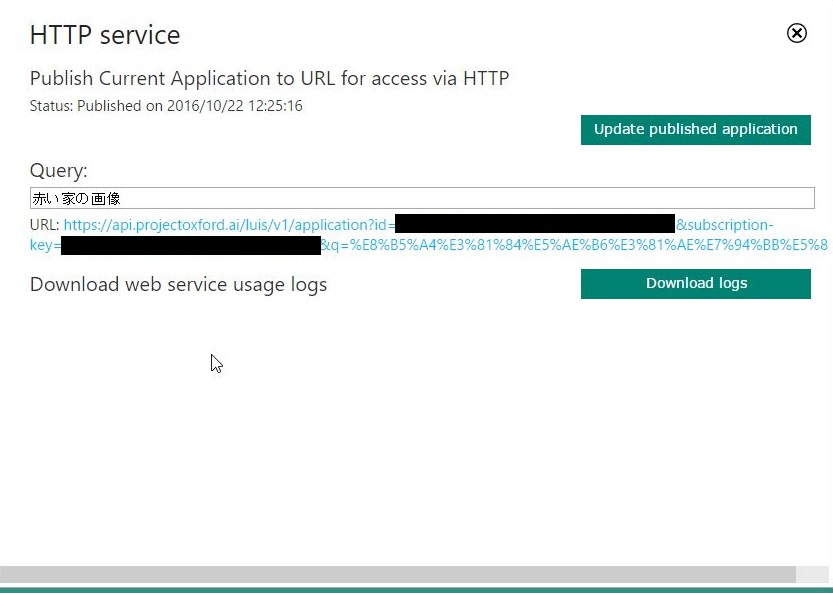
で、うまく「赤い家」が Get できました。
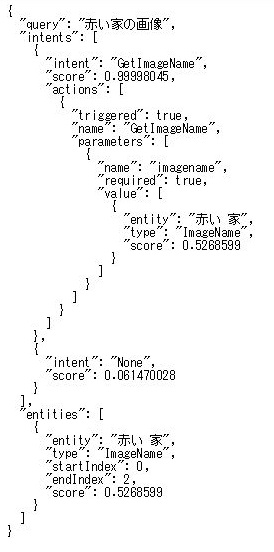
こんな感じです。
ソース
ひとまず、Bot framework を使って追加したソースをぺたぺた。
色んなAPI KeyがあるからGitにUPしづらいのですが、なんかその辺簡単にクリアできたりしないのかな。。。
MessagesController.cs
using System;
using System.Linq;
using System.Net;
using System.Net.Http;
using System.Threading.Tasks;
using System.Web.Http;
using Microsoft.Bot.Connector;
using Newtonsoft.Json;
using Microsoft.Cognitive.LUIS;
using Microsoft.ProjectOxford.Vision;
using Microsoft.ProjectOxford.Vision.Contract;
using Microsoft.ProjectOxford.Emotion;
using Microsoft.ProjectOxford.Emotion.Contract;
using y9demoimgaearch.Model;
using System.Collections.Generic;

namespace y9demoimgaearch
{
    [BotAuthentication]
    public class MessagesController : ApiController
    {
        ///
<summary>
        /// POST: api/Messages
        /// Receive a message from a user and reply to it
        /// </summary>

        public async Task<HttpResponseMessage> Post([FromBody]Activity activity)
        {
            if (activity.Type == ActivityTypes.Message)
            {
                ConnectorClient connector = new ConnectorClient(new Uri(activity.ServiceUrl));
                string msg = "";
                string ImgUrl ="";

                // ★★ 文字数をチェック ★★
                if (activity.Text.Length > 0)
                {
                    // ★★ LUISを実行(検索するImageNameを取得) ★★
                    String ImgName = await ExecLUIS(activity.Text);

                    if (ImgName.Length == 0)
                    {
                        // LUISで検索キーワードが引っこ抜けないのでそのままの文字で検索
                        ImgName = activity.Text;
                    }
                    // ★★ 画像検索を実行(画像のURLをGet) ★★
                    ImgUrl = await ExecBingSearch(ImgName);

                    // 画像のURLを取得できなかった時。
                    if (ImgUrl.Length > 0)
                    {
                        // ★★ Computer Vision で画像分析(分析結果の文字列を取得) ★★
                        String VisionMsg = await ExecVisionAnalysis(ImgUrl);

                        // ★★ Emotion APIで感情分析(一番高いスコアの感情を取得) ★★
                        String EmotionMsg = await ExecEmotionAnalysis(ImgUrl);
                        msg = VisionMsg + EmotionMsg;
                    }
                    else
                    {
                        msg = "画像が見つかりませんでした。";
                    }
                }
                else
                {
                    // 文字入力してよ!!!
                    msg = "何か入力してください!!";
                }

                // Bot の応答
                var reply = activity.CreateReply();
                reply.Recipient = activity.From;
                reply.Type = ActivityTypes.Message;
                reply.Text = msg;
                reply.Attachments = new System.Collections.Generic.List<Attachment>();
                if(ImgUrl.Length>0)
                {
                    reply.Attachments.Add(new Attachment()
                    {
                        ContentUrl = ImgUrl,
                        ContentType = "image/png"
                    });
                }

                await connector.Conversations.ReplyToActivityAsync(reply);
            }
            else
            {
                HandleSystemMessage(activity);
            }
            var response = Request.CreateResponse(HttpStatusCode.OK);
            return response;
        }


        private async Task<string> ExecLUIS(string Input)
        {
            // Application ID, Application Key をセットして LuisClient を作成
            string luisAppId = "[APP ID]";
            string luisAppKey = "[APP Key]";
            LuisClient luisClient = new LuisClient(luisAppId, luisAppKey, true);

            // LUIS に受信したメッセージを送って解析 (※activity.text はユーザー入力値)
            LuisResult luisResult = await luisClient.Predict(Input);

            String retStr = "";
            // 解析結果 (Intent) に応じた処理を実行
            if (luisResult != null)
            {
                try
                {
                    if (luisResult.Intents[0].Actions[0].Name.Equals("GetImageName"))
                    {
                        var entities = luisResult.GetAllEntities();

                        foreach (Microsoft.Cognitive.LUIS.Entity entity in entities)
                        {
                            switch (entity.Name)
                            {
                                case "ImageName":
                                    retStr = entity.Value.Replace(" ", "");
                                    break;
                            }
                        }
                    }
                    else
                    {
                        // LUISがうまく機能してない
                        Console.Out.WriteLine("LUISがうまく機能してない");
                    }
                }
                catch (Exception e)
                {
                    // LUISの実行は成功したけど、検索キーワードはうまく取得できず
                    Console.Out.WriteLine("LUISで検索キーワードをうまく取れてない");
                    Console.Out.WriteLine(e.Message);
                }
            }
            return (retStr);
        }

        private async Task<string> ExecBingSearch(string ImgUri)
        {
            String retStr = "";
            string apiKey = "[API Key]";
            string queryUri = "https://api.cognitive.microsoft.com/bing/v5.0/images/search"
                              + "?q=" + System.Web.HttpUtility.UrlEncode(ImgUri);

            HttpClient client = new HttpClient();
            client.DefaultRequestHeaders.Add("Ocp-Apim-Subscription-Key", apiKey); //authentication header to pass the API key
            client.DefaultRequestHeaders.Add("Accept", "application/json");
            string bingRawResponse = null;
            BingImageSearchResponse bingJsonResponse = null;

            try
            {
                bingRawResponse = await client.GetStringAsync(queryUri);
                bingJsonResponse = JsonConvert.DeserializeObject<BingImageSearchResponse>(bingRawResponse);

                ImageResult[] imageResult = bingJsonResponse.value;

                // 最初のURLだけを取得
                retStr = imageResult[0].contentUrl;
            }
            catch (Exception e)
            {
                //Bing SearchのNG
                Console.Out.WriteLine("Bing Img Searchのエラー");
                Console.Out.WriteLine(e.Message);
            }

            return (retStr);
        }

        private async Task<string> ExecVisionAnalysis(string url)
        {
            string retstr = "";
            string visionApiKey = "[API Key]";

            VisionServiceClient visionClient = new VisionServiceClient(visionApiKey);
            VisualFeature[] visualFeatures = new VisualFeature[] {
                                        VisualFeature.Adult, //recognize adult content
                                        VisualFeature.Categories, //recognize image features
                                        VisualFeature.Description //generate image caption
                                        };
            AnalysisResult analysisResult = null;

            try
            {
                analysisResult = await visionClient.AnalyzeImageAsync(url, visualFeatures);

                if (analysisResult != null)
                {
                    if (analysisResult.Adult.IsAdultContent == true)
                    {
                        retstr += "[Adult]";
                    }
                    else if (analysisResult.Adult.IsRacyContent == true)
                    {
                        retstr += "[Racy]";
                    }

                    // 最初のをセット(日本語化したいけど、Transfer 使うしかないかな?)
                    retstr += analysisResult.Description.Captions[0].Text;
                }
            }
            catch (Exception e)
            {
                //Vision APIの実行エラー
                Console.Out.WriteLine("Vision APIの実行エラー");
                Console.Out.WriteLine(e.Message);
            }

            return (retstr);
        }

        private async Task<string> ExecEmotionAnalysis(string url)
        {
            string retstr = "";
            string emotionApiKey = "[API Key]";

            EmotionServiceClient emotionServiceClient = new EmotionServiceClient(emotionApiKey);

            try
            {
                Emotion[] emotionResult = null;
                // Emotion API の実行
                emotionResult = await emotionServiceClient.RecognizeAsync(url);
                Scores emotionScores = emotionResult[0].Scores;

                // 一番高いスコアの取得
                IEnumerable<KeyValuePair<string, float>> emotionList = new Dictionary<string, float>()
                            {
                                { "angry", emotionScores.Anger},
                                { "contemptuous", emotionScores.Contempt },
                                { "disgusted", emotionScores.Disgust },
                                { "frightened", emotionScores.Fear },
                                { "happy", emotionScores.Happiness},
                                { "neutral", emotionScores.Neutral},
                                { "sad", emotionScores.Sadness },
                                { "surprised", emotionScores.Surprise}
                            }
                .OrderByDescending(kv => kv.Value)
                .ThenBy(kv => kv.Key)
                .ToList();

                KeyValuePair<string, float> topEmotion = emotionList.ElementAt(0);
                string topEmotionKey = topEmotion.Key;
                int topEmotionScore = (int)(topEmotion.Value*100);

                retstr = "[Emotion]"+topEmotionKey + "[" + topEmotionScore.ToString() + "%]";
            }
            catch (Exception e)
            {
                //Emotion APIの実行エラー
                Console.Out.WriteLine("Emotion APIの実行エラー");
                Console.Out.WriteLine(e.Message);
            }

            return (retstr);
        }

        private Activity HandleSystemMessage(Activity message)
        {
            if (message.Type == ActivityTypes.DeleteUserData)
            {
                // Implement user deletion here
                // If we handle user deletion, return a real message
            }
            else if (message.Type == ActivityTypes.ConversationUpdate)
            {
                // Handle conversation state changes, like members being added and removed
                // Use Activity.MembersAdded and Activity.MembersRemoved and Activity.Action for info
                // Not available in all channels
            }
            else if (message.Type == ActivityTypes.ContactRelationUpdate)
            {
                // Handle add/remove from contact lists
                // Activity.From + Activity.Action represent what happened
            }
            else if (message.Type == ActivityTypes.Typing)
            {
                // Handle knowing tha the user is typing
            }
            else if (message.Type == ActivityTypes.Ping)
            {
            }

            return null;
        }
    }
}
Model/BingImageSearchResponse.cs
using System;
using System.Collections.Generic;
using System.Linq;
using System.Web;

namespace y9demoimgaearch.Model
{
    public class BingImageSearchResponse
    {
        public string _type { get; set; }
        public int totalEstimatedMatches { get; set; }
        public string readLink { get; set; }
        public string webSearchUrl { get; set; }
        public ImageResult[] value { get; set; }
    }

    public class ImageResult
    {
        public string name { get; set; }
        public string webSearchUrl { get; set; }
        public string thumbnailUrl { get; set; }
        public object datePublished { get; set; }
        public string contentUrl { get; set; }
        public string hostPageUrl { get; set; }
        public string contentSize { get; set; }
        public string encodingFormat { get; set; }
        public string hostPageDisplayUrl { get; set; }
        public int width { get; set; }
        public int height { get; set; }
        public string accentColor { get; set; }
    }
}
おまけ
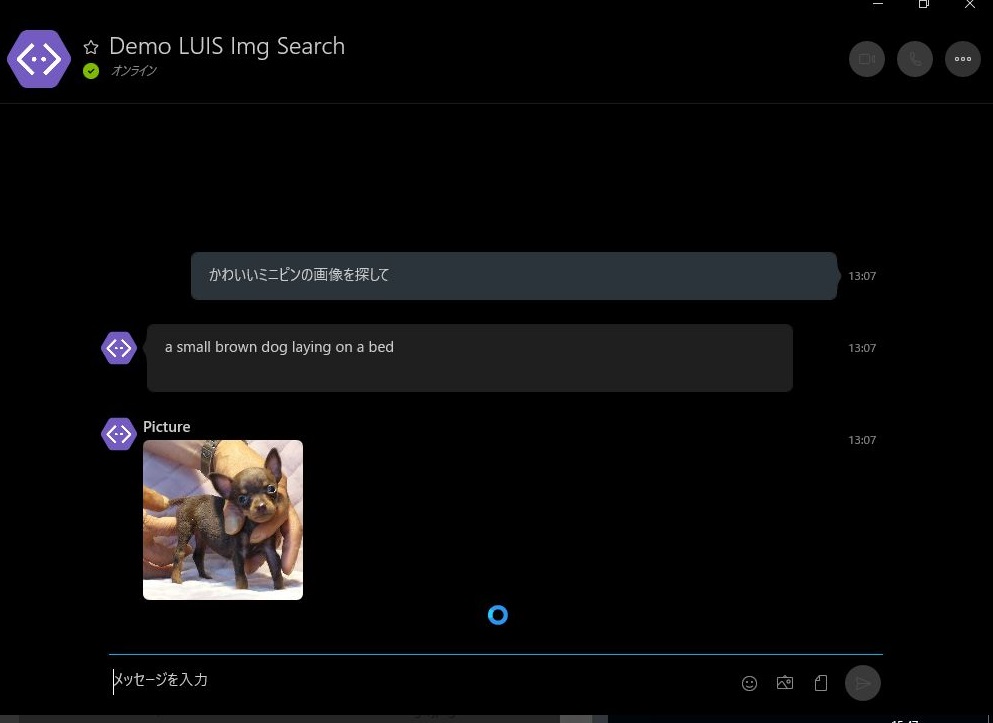
ついでに Skype Bot も試してみました~。Bot Framework から Add to Skype のボタンを押しただけだけどw
Skype for Business とかに展開する方法がまだわからない・・・


コメント