Virtual Machine Scale Sets(以降、VMSS) を試してみました。
VMSS のドキュメント
https://azure.microsoft.com/ja-jp/documentation/articles/virtual-machine-scale-sets-windows-create/
VMMSSは、2016/3/31にGAしたばかりの機能です。
https://azure.microsoft.com/en-us/updates/general-availability-virtual-machine-scale-sets/
ポータルからもVMSSを作成することができます。
こんな感じで、Windows と Linux が選べます。
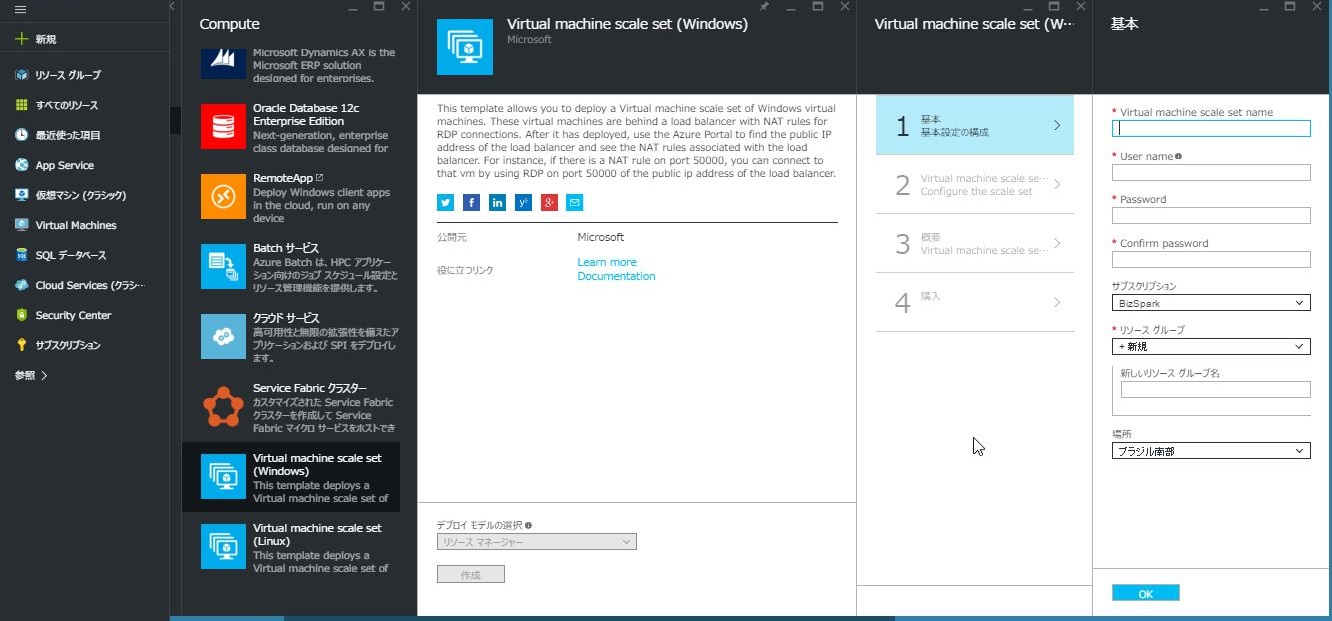
作成が完了すると、様々なサービスとともにVMSSが構成されます。
初期の状態では、NAT構成でWindows であればRDP、LinuxであればSSHがポートフォワードされる構成になってます。
ここで、各VM で IISをインストールします。
(ひとまず手動で)
やっぱ、IISは、外から接続させたいし、せっかくなんで負荷分散したいし。。。
ってことで、Load Balancerをいじってみるが。。。
うまくいかない。。。
※ (追記)
ロードバランサーの設定は、とても簡単です。できなかったのは、自分の調査不足でした。。。。
Virtual Machine Scale Sets のロードバランサーの設定
じゃー、NATなしの構成にしたいのでARMを使ってみましょうか。
Web から、ネタを集めて組み合わせ作ってみました。
{
  "$schema": "https://schema.management.azure.com/schemas/2015-01-01/deploymentTemplate.json#",
  "contentVersion": "1.0.0.0",
  "parameters": {
  },
  "variables": {
  },
  "resources": [
    {
      "name": "[concat('agodemostorage', copyIndex())]",
      "type": "Microsoft.Storage/storageAccounts",
      "location": "East US",
      "apiVersion": "2015-06-15",
      "properties": {
        "accountType": "Standard_LRS"
      },
      "copy": {
        "name": "teststoragecopy",
        "count": 5
      }
    },
    {
      "name": "testvnet",
      "type": "Microsoft.Network/virtualNetworks",
      "location": "East US",
      "apiVersion": "2016-03-30",
      "properties": {
        "addressSpace": {
          "addressPrefixes": [
            "10.0.0.0/16"
          ]
        },
        "subnets": [
          {
            "name": "testsubnet0",
            "properties": {
              "addressPrefix": "10.0.0.0/24"
            }
          }
        ]
      }
    },
    {
      "apiVersion": "2016-03-30",
      "type": "Microsoft.Network/publicIPAddresses",
      "name": "testip",
      "location": "East US",
      "properties": {
        "publicIPAllocationMethod": "Dynamic",
        "dnsSettings": {
          "domainNameLabel": "agoendpoint"
        }
      }
    },
    {
      "name": "testlb",
      "type": "Microsoft.Network/loadBalancers",
      "location": "East US",
      "apiVersion": "2016-03-30",
      "dependsOn": [
        "Microsoft.Network/publicIPAddresses/testip"
      ],
      "properties": {
        "frontendIPConfigurations": [
          {
            "name": "testfrontend",
            "properties": {
              "publicIPAddress": {
                "id": "[resourceId('Microsoft.Network/publicIPAddresses','testip')]"
              }
            }
          }
        ],
        "backendAddressPools": [
          {
            "name": "testbackend"
          }
        ],
        "loadBalancingRules": [
          {
            "Name": "rule01",
            "properties": {
              "frontendIPConfiguration": {
                "id": "[concat(resourceId('Microsoft.Network/loadBalancers', 'testlb'), '/frontendIpConfigurations/testfrontend')]"
              },
              "backendAddressPool": {
                "id": "[concat(resourceId('Microsoft.Network/loadBalancers', 'testlb'), '/backendAddressPools/testbackend')]"
              },
              "probe": {
                "id": "[concat(resourceId('Microsoft.Network/loadBalancers', 'testlb'), '/probes/testprobe')]"
              },
              "protocol": "Tcp",
              "frontendPort": 80,
              "backendPort": 80
            }
          }
        ],
        "probes": [
          {
            "name": "testprobe",
            "properties": {
              "protocol": "Tcp",
              "port": 80,
              "intervalInSeconds": 15,
              "numberOfProbes": 2
            }
          }
        ]
      }
    },
    {
      "name": "testss",
      "type": "Microsoft.Compute/virtualMachineScaleSets",
      "location": "East US",
      "apiVersion": "2016-03-30",
      "dependsOn": [
        "teststoragecopy",
        "Microsoft.Network/virtualNetworks/testvnet",
        "Microsoft.Network/loadBalancers/testlb"
      ],
      "sku": {
        "name": "Standard_A2",
        "tier": "Standard",
        "capacity": "5"
      },
      "properties": {
        "upgradePolicy": {
          "mode": "Manual"
        },
        "virtualMachineProfile": {
          "storageProfile": {
            "osDisk": {
              "vhdContainers": [
                "http://agodemostorage0.blob.core.windows.net/vhds",
                "http://agodemostorage1.blob.core.windows.net/vhds",
                "http://agodemostorage2.blob.core.windows.net/vhds",
                "http://agodemostorage3.blob.core.windows.net/vhds",
                "http://agodemostorage4.blob.core.windows.net/vhds"
              ],
              "name": "testdisk",
              "caching": "ReadOnly",
              "createOption": "FromImage"
            },
            "imageReference": {
              "publisher": "MicrosoftWindowsServer",
              "offer": "WindowsServer",
              "sku": "2012-R2-Datacenter",
              "version": "latest"
            }
          },
          "osProfile": {
            "computerNamePrefix": "testvm",
            "adminUsername": "demouser",
            "adminPassword": "P@ssw0rd01"
          },
          "networkProfile": {
            "networkInterfaceConfigurations": [
              {
                "name": "testnic0",
                "properties": {
                  "primary": "true",
                  "ipConfigurations": [
                    {
                      "name": "ipconfig0",
                      "properties": {
                        "subnet": {
                          "id": "[concat(resourceId('Microsoft.Network/virtualNetworks', 'testvnet'), '/subnets/testsubnet0')]"
                        },
                        "loadBalancerBackendAddressPools": [
                          {
                            "id": "[concat(resourceId('Microsoft.Network/loadBalancers','testlb'), '/backendAddressPools/testbackend')]"
                          }
                        ]
                      }
                    }
                  ]
                }
              }
            ]
          }
        }
      }
    },
    {
      "name": "jumpboxtestst",
      "type": "Microsoft.Storage/storageAccounts",
      "location": "East US",
      "apiVersion": "2015-06-15",
      "properties": {
        "accountType": "Standard_LRS"
      }
    },
    {
      "apiVersion": "2016-03-30",
      "type": "Microsoft.Network/publicIPAddresses",
      "name": "jumpboxip",
      "location": "East US",
      "properties": {
        "publicIPAllocationMethod": "Dynamic",
        "dnsSettings": {
          "domainNameLabel": "testpubdomain"
        }
      }
    },
    {
      "name": "jumpboxnic",
      "type": "Microsoft.Network/networkInterfaces",
      "location": "East US",
      "apiVersion": "2016-03-30",
      "dependsOn": [
        "Microsoft.Network/virtualNetworks/testvnet",
        "Microsoft.Network/publicIPAddresses/jumpboxip"
      ],
      "properties": {
        "ipConfigurations": [
          {
            "name": "ipconfig1",
            "properties": {
              "privateIPAllocationMethod": "Dynamic",
              "subnet": {
                "id": "[concat(resourceId('Microsoft.Network/virtualNetworks', 'testvnet'), '/subnets/testsubnet0')]"
              },
              "publicIPAddress": {
                "id": "[resourceId('Microsoft.Network/publicIPAddresses', 'jumpboxip')]"
              }
            }
          }
        ]
      }
    },
    {
      "name": "jumpboxvm",
      "type": "Microsoft.Compute/virtualMachines",
      "location": "East US",
      "apiVersion": "2016-03-30",
      "dependsOn": [
        "Microsoft.Storage/storageAccounts/jumpboxtestst",
        "Microsoft.Network/networkInterfaces/jumpboxnic"
      ],
      "properties": {
        "hardwareProfile": {
          "vmSize": "Basic_A1"
        },
        "osProfile": {
          "computername": "jumpbox-server",
          "adminUsername": "demouser",
          "adminPassword": "P@ssw0rd01"
        },
        "storageProfile": {
          "imageReference": {
            "publisher": "MicrosoftWindowsServer",
            "offer": "WindowsServer",
            "sku": "2012-R2-Datacenter",
            "version": "latest"
          },
          "osDisk": {
            "name": "testdisk",
            "vhd": {
              "uri": "http://jumpboxtestst.blob.core.windows.net/vhds/test.vhd"
            },
            "caching": "ReadWrite",
            "createOption": "FromImage"
          }
        },
        "networkProfile": {
          "networkInterfaces": [
            {
              "id": "[resourceId('Microsoft.Network/networkInterfaces', 'jumpboxnic')]"
            }
          ]
        }
      }
    }
  ],
  "outputs": {
  }
}
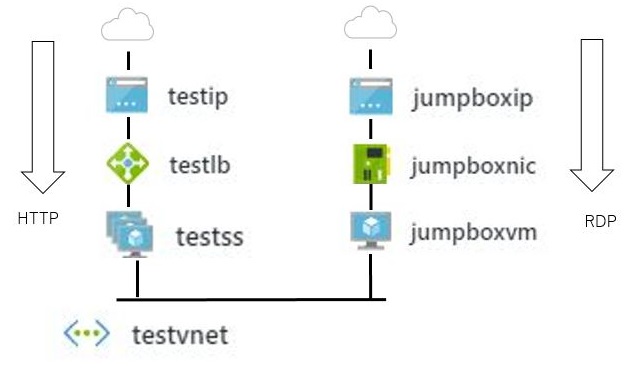
出来上がった構成はこんな感じ
HTTPの矢印が、VMSS(testss)で5台のVMが、ロードバランサ(testlb)で負荷分散して、testipのIPアドレスで受信します。
jumpboxvmは、管理用のマシンでRDPで外からつなげてさらにRDPでVMSSに接続できるようにしました。
まぁー、色々問題あるような気がするけど、ひとまずってことで。
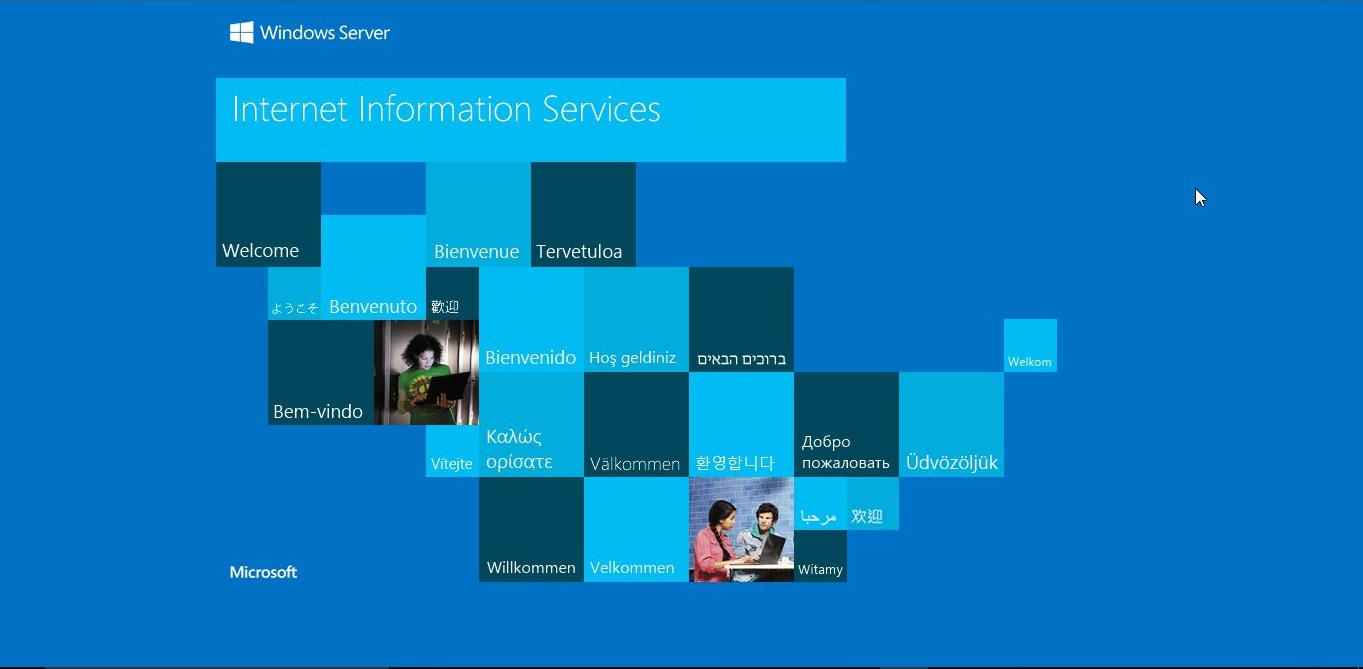
ひとまず、うまくいったっぽい。
ポータルで綺麗にやる方法は、どうするんだろ??
ロードバランサを多段にするとかなのかな??
まとめ
VMSSで仮想マシンのプールを簡単に作れるのはいいですよね。
資料をみているとオートスケールみたいなこともできるっぽいし。
だけど、IaaSだとネットワーク周りを気にしなきゃいけないし、Web アプリをホストするならWeb Appの方が感覚的には楽でいいなぁー。
あと、検証している途中(4/13あたり)で、VMSSで作成するVMのcomputerNamePrefixが8文字以内に変更になったみたいです。。。


コメント